

Importing a price list
How do I import a supplier price list, rate sheet or labour schedule?
Price lists enter the organisation through the Vault import wizard under Price sources. This is not the Templates screen.
What to watch for
- Import needs the Site Admin or Org Admin role. Without it you will not see Import.
- Accepted files: CSV, TSV, XLSX, XLSM, or PDF (up to 32 MB).
- You choose a kind first: Material price book, Rate sheet, or Labour schedule — the review steps differ by kind.
- Classification and product links need review before Commit import.
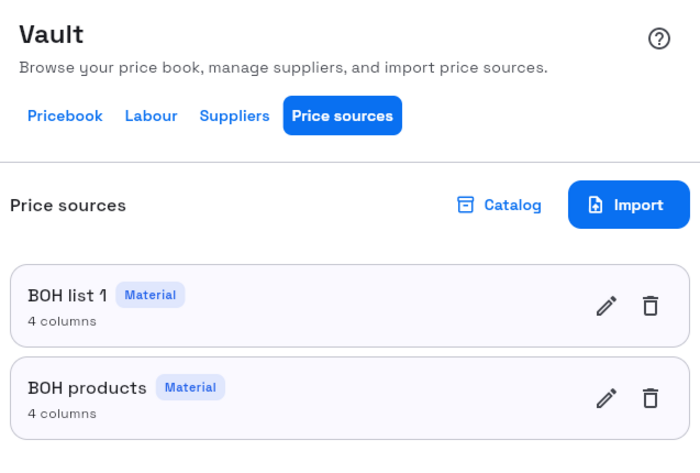
1. Open Vault → Price sources
- Left rail Vault.
- Select Price sources (or
/vault?tab=price-sources). - Select Import.
2. Upload step
- Dialog title Import price source.
- Choose kind: Material price book, Rate sheet, or Labour schedule.
- Set Name and optional Default supplier for this price source.
- Select Choose a file, then Upload & continue.
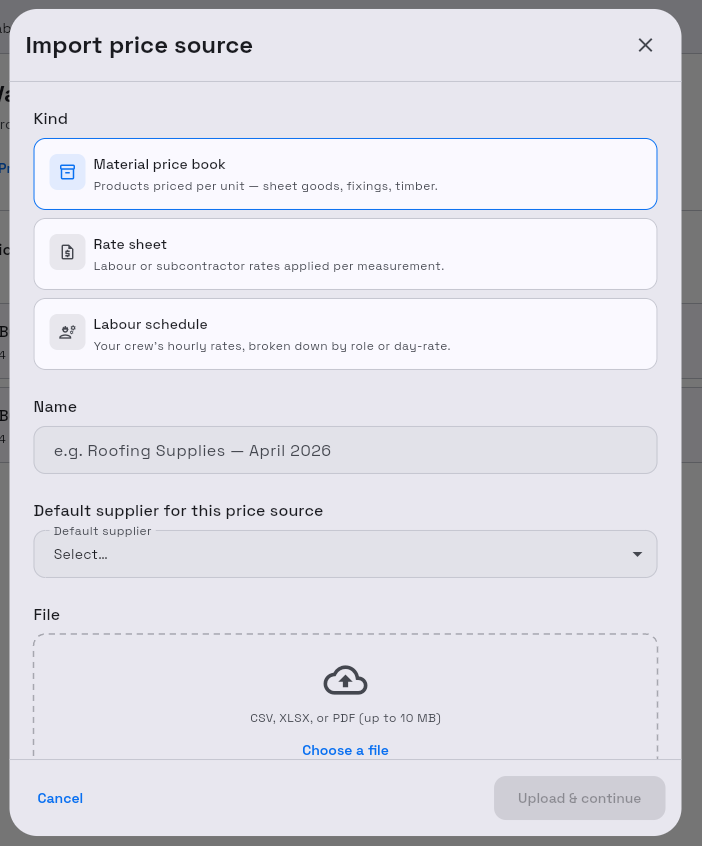
Success: the wizard moves into analysis (Analyzing…), then the review steps.
3. Review steps
Step pills can include Upload, Columns, Suppliers, Duplicates, Labour rates, Classify, and Review depending on kind and file.
Typical decisions:
| Step | What you do |
|---|---|
| Columns | Confirm Detected columns |
| Suppliers | Attach, Create, or Ignore suggested suppliers |
| Duplicates | Keep all, Replace all, Override, or Skip |
| Labour rates | Mark Rate vs Modifier, Confirm all when ready |
| Classify | Assign subcategories |
4. Commit
- Select Commit import (Committing… while it runs).
- Confirm Import complete and {n} rows imported.
- Select Done.
Later versions: open the price source → Versions → Upload new version when you need a new file revision. The active version is marked Active.